


 Back to all guides
ORDER AND TRANSFER GUIDES
Spent 100 USDT? Check how much BTC you received
Received less BTC than expected? Reconcile fills, average price and fees, separate BNB charges from wallet valuation, and work through a multi-fill example.
Updated · Based on the official references below
Sources, writing process, and referral disclosure
Bought BTC and received less than you expected? Before assuming an extra fee, check which number you are looking at: the BTC quantity or its changing USDT value. Open the trade record and separate spending, filled quantity, and fees. The spot BTC/USDT example below uses an assumed price and 0.1% fee, not live rates for your account.
From 100 USDT to net BTC
- 100.00 USDT
Total example budget
- 99.90 USDT
After a fee equivalent to 0.10 USDT
- 0.001998 BTC
Net amount at 50,000 USDT per BTC
Fixed teaching example at a hypothetical 0.1% fee. Actual fees may be charged in BTC or another asset. Do not deduct the fee twice.
Start with the units
100 USDT is the amount spent; BTC is the quantity purchased. Comparing the two numbers directly is like expecting 100 kilograms of rice from a payment of 100 dollars. You need the execution price per BTC to convert money into a quantity.
Keep three figures separate: the estimate before submitting, the quantity actually traded, and the net increase after relevant fees. A wallet's value expressed in USDT is a fourth figure. It changes with the market and is not the amount spent on this purchase.
Work through the 100 USDT example
Assume a fixed price of 50,000 USDT per BTC and a 0.1% fee. To make the cost visible, the practice shows the fee's USDT equivalent before calculating the net BTC quantity.
Fee equivalent: 100 × 0.001 = 0.10 USDT. Net value after the fee: 100 − 0.10 = 99.90 USDT. Net quantity: 99.90 ÷ 50,000 = 0.001998 BTC.
If the fee is deducted from the BTC received, the same assumptions give 100 ÷ 50,000 = 0.002 BTC before fees. Subtract 0.002 × 0.001 = 0.000002 BTC to arrive at the same 0.001998 BTC. These are two ways to express one cost, not two fees to deduct. Actual platforms apply their asset precision rules to small fractions.
The fee is not always charged in USDT
Binance's spot fee guide describes fees in the asset received and directs users to Trade History for the actual charge. Check the unit on the fee line when investigating a smaller BTC amount. [1]
Binance also offers payment of trading fees with BNB. Whether a fill actually uses BNB depends on account and pair settings, eligibility, and sufficient BNB at the time. Remembering that you enabled a switch is not enough. [2][6]
Separate the practice's 0.10 USDT fee equivalent from the asset named on a real trade record. If BNB paid the fee separately, do not automatically subtract the practice's percentage from the BTC amount again.
Take a separate fictional record: filled quantity 0.002 BTC, fee 0.00015 BNB, and no other relevant fee. The purchase adds 0.002 BTC while BNB falls by 0.00015. At an assumed BNB valuation of 500 USDT, the fee is worth 0.075 USDT. That conversion is not another USDT debit, and you should not subtract it from BTC again. This example does not calculate a platform discount; use the actual fee record.
Two ways to express the same fee
Use one calculation, not both. Assumes a 0.1% fee deducted from the purchased BTC, expressed above in two equivalent units.
Execution prices change the quantity too
If the worked example used a price of 51,000 with everything else unchanged, 99.90 ÷ 51,000 is approximately 0.00195882 BTC. This is less than the original example because the purchase price is higher, not because the fee rate increased.
A trade can execute at a different price from the one seen before submission; this difference is called slippage. One order can also match at several price levels, so its average price must account for the quantity at each fill. [3]
After the purchase, the displayed valuation can change while the BTC quantity stays identical. For example, 0.001998 BTC valued at 49,000 is 97.902 USDT. That recalculation alone is not evidence of another fee.
One order, several fills: reconcile price and BTC
One order ID with three fill rows does not necessarily mean you submitted three orders. Group fills by order ID, then total quantity, spending and fees separately. This independently written fictional ledger assumes all three fills completed, each with a 0.1% fee charged in BTC and no other fee. [5]
Fill 1: 0.001 BTC × 49,000 = 49 USDT; fee 0.000001 BTC.
Fill 2: 0.0005 BTC × 50,000 = 25 USDT; fee 0.0000005 BTC.
Fill 3: 0.0005 BTC × 52,000 = 26 USDT; fee 0.0000005 BTC.
Together the rows cost 100 USDT and trade 0.002 BTC. The average execution price is total trade value divided by total filled quantity: 100 ÷ 0.002 = 50,000 USDT per BTC. Simply averaging the three prices gives about 50,333.33 and is wrong here because the quantities differ.
Fees total 0.000002 BTC, leaving a net increase of 0.001998 BTC. Three fills do not mean three extra fees on the whole order; each row in this example is charged on its own quantity once. If actual fills have different rates or fee assets, total the recorded charges individually instead of applying one rate.
Dividing spending by net received gives 100 ÷ 0.001998, or about 50,050.05 USDT per BTC. That includes this purchase fee, so it exceeds the execution average of 50,000. The first figure reconciles execution prices; the second measures this example’s spending per net BTC received. Neither calculation includes a future sale or withdrawal fee.
Why are there maker and taker rates?
A maker leaves an order on the book for someone else to match. A taker matches an existing order. A limit order can be a taker if it matches as soon as it arrives, so the word “limit” alone does not determine the fee. [4]
For a teaching example, suppose an offer is available at 50,000 and your buy limit is 50,100. That limit permits a match at 50,000; it does not require the market to reach 50,100 first. Check how a fill executed before choosing which rate to compare. This guide does not assume makers trade for free.
How to reconcile an actual trade
Find the matching spot pair and order time, then follow the checklist below. A home-screen account total can include unrelated assets and activities, so it cannot reconcile one purchase.
Binance points to Trade History for individual fees. OKX directs users to Order history, then Details and Fee. Labels can vary by region, device and language. [1][5]
- Check whether the order filled completely; an estimated quantity is not a received quantity.
- Record each fill's quantity and price, plus the fee amount and fee asset.
- Add the purchased quantities; subtract relevant fees if charged in the purchased asset.
- If another asset paid the fee, reconcile its change separately.
- Check account movements over the same period for other trades, transfers or withdrawals. If the difference remains unexplained, keep the order ID and use the platform's official support channel.
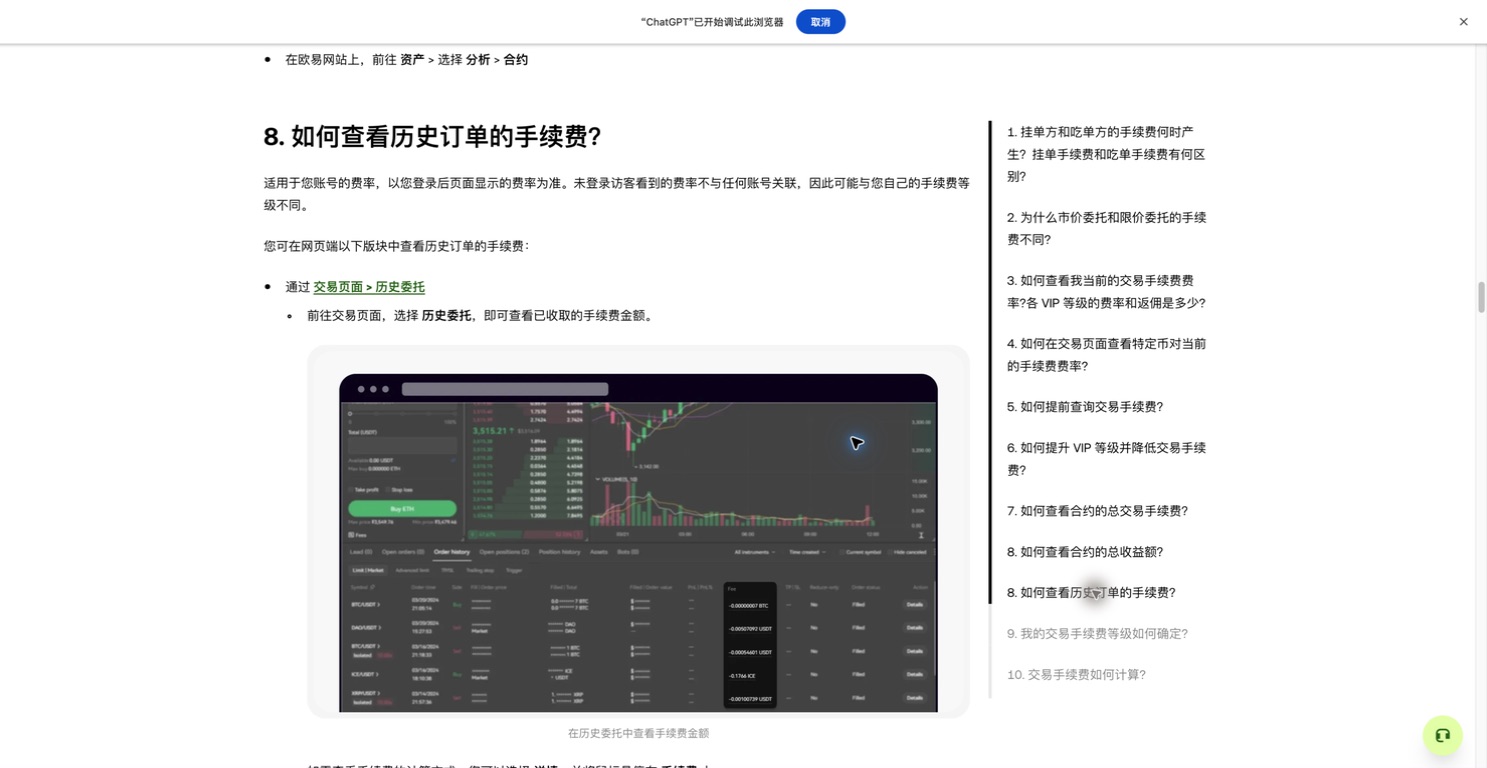
Locate the fee column in order history, then check which asset paid the fee. Captured on 2026-09-07 from OKX Europe’s Chinese help page. This is an official teaching illustration, not our account activity. Click to enlarge.
© 2026 OKX · View the official articleReceived less? Start with the number that differs
Name the number that looks short before looking for an explanation. These checks narrow the search; one symptom alone does not establish the cause.
- Estimated quantity differs from filled quantity: check whether the order completed, then inspect each execution price. Calculate the effects of a partial fill and a price change separately.
- Filled quantity differs from the asset increase: check the fee asset first. Subtract fees from purchased quantity only when charged in that asset. Reconcile BNB separately if it paid the fee, then account for other trades and transfers.
- BTC quantity is unchanged but its USDT value fell: multiply that same BTC quantity by the price used for each valuation. Separate a price change from an asset debit; a valuation difference cannot establish a fee.
- Full records still do not reconcile: collect the order ID, pair, time with timezone, fills, fees and the account movements you are comparing. Use support inside the official site or app, stating the asset and unexplained quantity. Do not provide passwords, verification codes or private keys.
Three common mix-ups
First, 0.1% means one thousandth, not one tenth: the example fee on 100 USDT is 0.10, not 10. Second, this guide covers spot order-book purchases; do not use its single formula to infer every cost of a card purchase, quick conversion or withdrawal. Third, reconcile coin quantities separately from their market valuation.
OKX distinguishes order-book trading from quoted Buy/Sell and Convert flows. It also notes that a market order can sometimes fill only partially with the remainder canceled. Neither submitting an order nor choosing “market” replaces checking the final record. [5]
Check your understanding in the practice
Complete a simulated purchase with 100 USDT, then change it to 200 USDT. With price and rate unchanged, can you predict a 0.20 USDT fee equivalent and 0.003996 BTC net before confirming?
Then explain why a real record may show a BTC fee while the practice shows its USDT equivalent. If you can answer both questions, you understand the basic reconciliation. The practice uses virtual funds and never creates an actual order.
A few useful answers
Will I always receive 0.001998 BTC?
No. It follows the example's assumptions: 100 USDT, 50,000 USDT per BTC and a 0.1% fee. A different amount, execution price or fee arrangement can produce a different result.
Why does the filled quantity differ from my wallet increase?
Check whether the fill quantity is before fees and whether the fee was deducted from the purchased asset. Then account for other trades and transfers in the same period. An account valuation is not a quantity reconciliation.
Is the rate on this site my personal rate?
No. The practice uses a fixed teaching rate. Platform reference information also does not replace the pair-specific rate shown in your account or the actual fee on a fill.
What if the last few decimal places differ?
Calculate from the full trade details instead of shortened display values, and note the actual fee asset. If the difference remains unexplained, ask official support rather than inferring a cause from its size.
Why was the fee charged in BTC after I enabled BNB payment?
Enabling the option does not guarantee every fill will use BNB. Check account and pair eligibility and whether enough BNB was available at the time, then read that fill’s fee asset. Binance’s spot documentation describes a fallback to the received asset when BNB is insufficient. Reconcile the recorded charge. [6]
Self-check: how do you total fills with different fee assets?
Suppose a fictional ledger has two fills of 0.001 BTC each. The first fee is 0.000001 BTC and the second is 0.00015 BNB, with no other fees or movements. Net BTC is 0.001 + 0.001 − 0.000001 = 0.001999, while BNB separately falls by 0.00015. You cannot add the two fee numbers and subtract the result from BTC: their units differ. Check the fee asset on each actual fill.
The guides and exercises work independently of platform registration. Some platform links are referral links, and we may earn a commission if you register through them.
Check the original sources
Interfaces and rules can change. Check the current screen for your account and region before taking action. These examples explain how things work; they are not trading recommendations.
