


 Back to all guides
ORDER AND TRANSFER GUIDES
Which network for USDT? Start with the recipient’s deposit page
Match the recipient’s USDT network first. Work through a fictional transfer record to separate withdrawal fees, net amount, TxID, confirmations and missing deposit credit.
Updated · Based on the official references below
Sources, writing process, and referral disclosure
Several networks appear in the USDT withdrawal menu. Which one should you choose? Start with the recipient’s deposit page, not the cheapest fee. Check which network it accepts, then match it on the sending side. Compare both screens rather than relying on a network you used before. This guide covers direct on-chain transfers, not bridges or transfers within an exchange.
Start at the receiving platform
- Receiving side
Confirm USDT · Ethereum and obtain its deposit details
- Sending side
Select USDT · Ethereum too; do not substitute Tron
- Before submitting
Recheck address, memo, service status and net amount
Network names illustrate matching only, not current platform support or a recommended network. No real address is used.
Start with the receiving side
Choose USDT on the recipient's deposit page and inspect its supported networks. Compare them with the sender's withdrawal page. Matching the coin name alone is insufficient: the networks must match too. Binance warns against choosing an incompatible option simply because it costs less. [1]
In this exercise, the recipient uses Ethereum, so selecting Tron on the sending side fails the check. Think of the asset as what you send and the network as the route. ERC20 and TRC20 commonly identify token transfers on Ethereum and TRON respectively; always read the platform's full label.
Same asset. Check the network too.
Left: sending side. Right: receiving side. A network match is only one check; address, asset contract and deposit requirements must also be correct.
Separate the token contract, recipient address and memo
A token contract identifies the asset; a recipient address identifies where it goes. Do not paste a token contract into the recipient field. OKX's web deposit details include Token contract, which helps check that a similarly named token is actually supported. [4]
Copy the receiving details from the recipient's current deposit page, then compare the complete pasted address. Include a memo or tag when that page requires one; not every asset does. Passing an address-format check does not establish that every other detail is correct. [3]
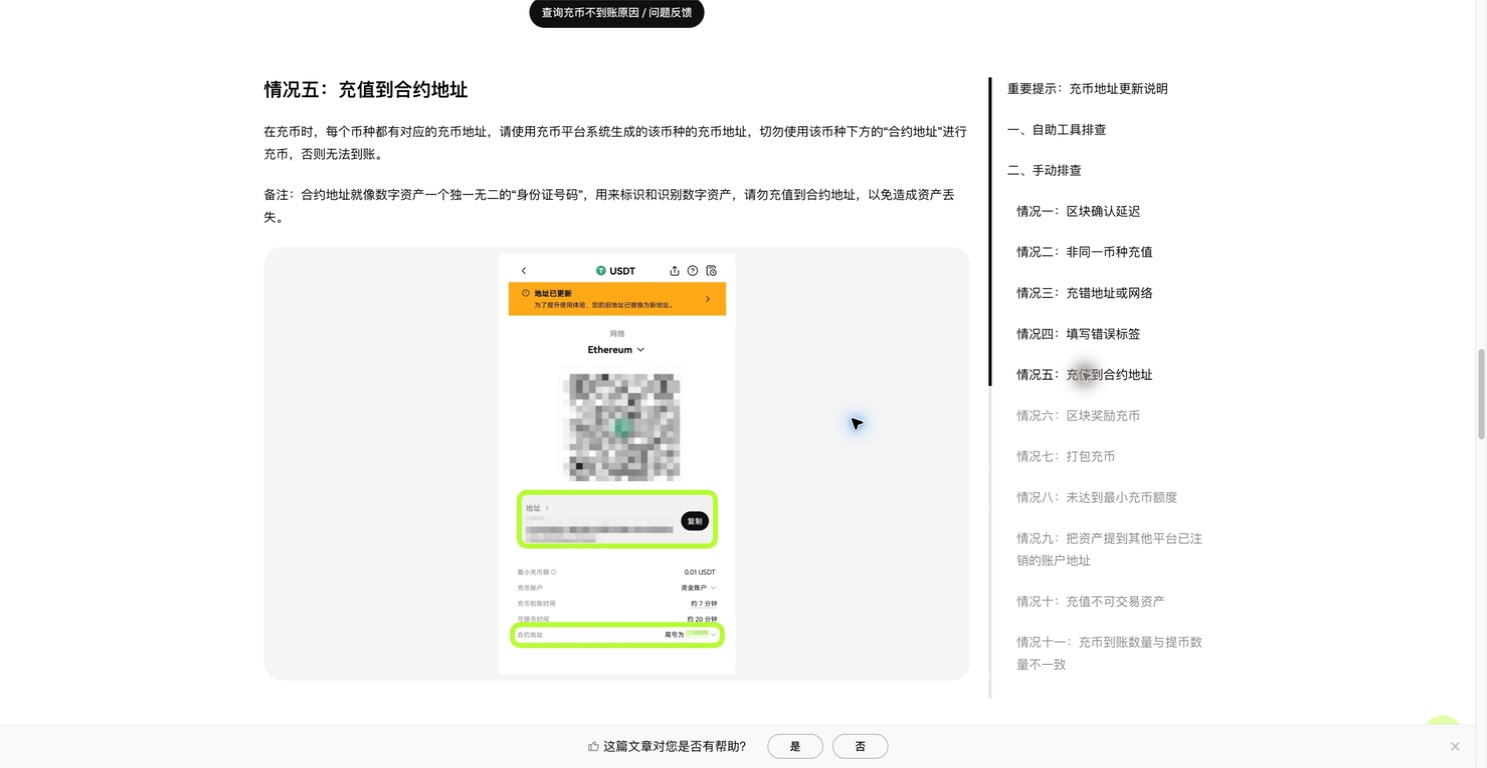
The deposit address and token-contract information are separate fields. The original official image obscures the address and QR code. Do not copy its example amounts or network status. Captured on 2026-09-07 from OKX Europe’s Chinese help page. This is an official teaching illustration, not our account activity. Click to enlarge.
© 2026 OKX · View the official articleCheck whether transfers are available now
Check withdrawal availability at the sender and deposit availability at the recipient separately. Maintenance or network upgrades can suspend services. An older screenshot cannot establish current availability; consult the platform's present notice. [5]
Before confirming, check again that the route remains available, the selected asset and network have not changed, and the address matches the recipient's current instructions. Resolve any uncertainty before submitting.
Compare the received amount with the minimum
The sender's withdrawal minimum and recipient's deposit minimum are separate checks. Binance displays the current withdrawal fee and minimum on its withdrawal page; OKX shows its deposit minimum on the deposit page. Check the selected asset and network. [2][3]
Our fixed example deducts 1 USDT from 10 USDT, leaving 9 USDT. With a fictional deposit minimum of 5 USDT, 9 ≥ 5 passes this amount check. These are teaching values, not live quotes or a promise that any real platform will credit a transfer.
An exchange's withdrawal charge need not equal actual on-chain gas. OKX notes that its charge can differ and may come from additional balance instead of the entered amount. Read the final received amount and total debit rather than applying 10−1 universally. [6]
Compare two invented fee methods with a 1 USDT charge: “send 10, receive 9” debits 10 in total; “receive 10, fee 1 extra” debits 11. Entering 10 therefore does not tell you what arrives. Write down the entered amount, fee, total debit and expected receipt together. Compare the receipt with the deposit minimum. These are our own examples; actual field labels vary.
What can a small test establish?
A small test can help establish whether a checked route credits successfully. It does not replace the earlier checks or guarantee safety. An amount can be too small to meet the deposit threshold, and repeated transfers add costs. A successful test does not remove the need to check every subsequent transfer.
Try the simulated exercise first: select a mismatched network, read the explanation, then choose the matching route and review the amount. The exercise creates no real deposit address and broadcasts no transaction.
Investigate a missing deposit in three steps
Do not rely solely on the sender's completed label. Keep the network, transaction hash (TxID), amount, time and recipient address. OKX's troubleshooting guidance distinguishes an on-chain lookup, confirmations and account crediting. [7]
- Start with the sending record: transfer method, status and TxID. If you only have a platform order number, or no record appears on the correct network, ask the sender to check broadcasting. An internal order number is not the transaction hash. [8]
- Check the correct network's explorer for the transaction result and confirmations. A different blockchain's result does not verify this transfer. [7]
- Check the recipient's deposit history. If confirmations are sufficient but credit is missing, contact its official support with the details and check the asset, address, memo, minimum and service status. [4]
Does having a TxID mean it worked? Read the result and confirmations separately
Open the blockchain explorer link from the withdrawal record. Check the network, then the execution result. Binance’s status guide shows that a TRON transaction can be CONFIRMED with a FAIL result. Reading only the confirmation label can send you down the wrong path. [9]
- Fail / Reverted: execution did not succeed. A failed Ethereum transaction can still spend gas. For an exchange withdrawal, ask the sending platform to check its withdrawal record and account debit; a failed on-chain result does not establish that your exchange balance has already been restored. [10]
- Success: check the asset, recipient and amount in the token transfer details. Ethereum token movements appear under Token Transfer. A successful transaction headline alone does not verify receipt of the particular USDT transfer you are tracing. [11]
- Too few confirmations: compare with the recipient’s current requirement. Deposit credit and permission to withdraw again can have different thresholds. If a credited balance cannot yet be withdrawn, check the applicable confirmation requirement. [7]
- Dropped & Replaced: obtain the new TxID from the sender and look up the replacement. Refreshing the old hash does not establish the replacement’s progress. [9]
Withdrawal completed, deposit missing: work through one fictional record
Record N-01 is an example written for this guide, not a platform transaction. All amounts, fees, thresholds and statuses are invented. It contains no real address or searchable transaction hash. The question is whether a completed withdrawal should already appear in the receiving account.
- Sending record: platform A → platform B; USDT on Ethereum; entered amount 12 USDT, fee 1 USDT deducted from it, expected receipt 11 USDT; total debit 12 USDT; status Completed; a TxID link is available in the record (no real hash is shown here).
- Receiving conditions: platform B accepts the same USDT contract and Ethereum network in this example; the complete recipient address matches; no memo is required here; minimum deposit 5 USDT, credit threshold 12 confirmations, deposits available.
- Checked at 10:00 UTC+8 on 2026-09-08: transaction result Success; token transfer details show the matching recipient and 11 USDT; 3 confirmations so far; platform B’s deposit is awaiting confirmations.
- Diagnosis now: 11 ≥ 5 passes the fictional amount check, but 3 < 12 does not meet the confirmation requirement. Save the record and follow its progress. Sending again to hurry the deposit would create another transfer.
- Next branch: suppose it later reaches 12 confirmations but platform B still has not credited it. Provide the latest check time, confirmation count and both records to the receiving platform. Meeting this example’s threshold alone does not prove it has lost the account entry.
Put the useful records in one support request
State where the transfer stopped, then attach the records. This avoids starting with only “my funds are missing.” The checklist below helps organize a request; it is not a platform’s acceptance policy. Binance identifies the TxID as useful information when contacting support. [8]
- Identity: sending platform, receiving platform, asset, network and TxID. If no TxID is available, say so and include the sending platform’s order reference.
- Amounts and timing: entered amount, fee and fee asset, expected or on-chain receipt, submission time with time zone, and latest check time.
- Checks: execution result, confirmation count and required threshold, and current deposit status. Record whether the address, token contract, memo/tag and minimum match. State discrepancies as found; do not rewrite the records to make them match.
- Keep attachments limited to this transfer. Submit through support you open from the official site or app, rather than posting account records publicly. Do not send passwords, verification codes, private keys or seed phrases. OKX says it will not ask for your seed phrase. [12]
A few useful answers
Can a transfer on the wrong network always be recovered?
No. Binance warns that a wrong network can cause unrecoverable loss. Ask the actual receiving platform's official support about its recovery options. Finding a transaction on-chain does not prove recovery is possible. [1]
Can I send directly between Ethereum USDT and Tron USDT?
They are not interchangeable deposit routes. This guide requires a matching network at both ends. Moving between networks is a separate process, not simply a different dropdown selection.
Is the 1 USDT fee a current withdrawal quote?
No. It is a fixed practice value. Check the actual platform screen for the current fee, deduction method and minimums.
Is the platform order number the same as a TxID?
No. The platform order number identifies the withdrawal request; the TxID is used to look up the blockchain transaction. Find TxID or View on blockchain in the sending record. If only an order number is available, ask the sender about broadcasting and a searchable hash. Our practice record numbers cannot be looked up on-chain. [8]
Will a second transfer combine with a deposit below the minimum?
Do not assume deposits will be combined. Another send creates another transfer and may incur another fee. Ask the recipient how below-minimum deposits for that asset and network are handled before taking another step. Someone else’s recovery result is not a guarantee for your transfer. [6]
Can I add a missing memo or tag after sending?
Do not send again to attach a note to the previous transfer. Provide the receiving platform’s official support with the omission, TxID and intended deposit details, and ask about its investigation process. Resolving account attribution is different from changing a transaction already sent. Eligibility and recovery depend on the platform and transfer. [4]
The guides and exercises work independently of platform registration. Some platform links are referral links, and we may earn a commission if you register through them.
Check the original sources
Interfaces and rules can change. Check the current screen for your account and region before taking action. These examples explain how things work; they are not trading recommendations.
- Binance — How to Deposit/Withdraw Cryptocurrency on Binance?
- Binance — Crypto Withdrawal Fees on Binance
- OKX — How do I make a deposit? (web)
- OKX — Why hasn't my deposit been credited?
- OKX — Why is my deposit/withdrawal suspended?
- OKX — Do I need to pay fees for deposit and withdrawal?
- OKX — How do I check my deposit progress?
- Binance — How to Find My Transaction ID (TxID)?
- Binance — How to Check Cryptocurrency Transaction Status on Blockchain?
- Etherscan — What are the Reasons for Failed Transactions?
- Etherscan — Transaction marked “Success”, but I can’t see my funds. Why?
- OKX — What’s a private key/seed phrase?
