


 Back to all guides
ORDER AND TRANSFER GUIDES
Why is your limit order still open? Check the price and status
Spot limit order unfilled, partly filled then cancelled, or funds still unavailable? Follow a 49,000 USDT limit and a complete ledger to check fills, reserved funds and fees.
Updated · Based on the official references below
Sources, writing process, and referral disclosure
The price touched your limit, so why is the order still open? First check which price you saw. A last-traded price at your limit does not mean enough sell orders were available to fill yours. Then check the order record: was nothing filled, or only part of it? This guide covers ordinary spot limit orders. Conditional orders, derivatives, and special execution instructions have separate rules.
A buy limit of 49,000: what happens next?
- Ask: 50,000
Above your ceiling → wait
- Ask: 48,000
Below your ceiling → price is eligible
- Check the fill
Available quantity and matching conditions still matter
Original teaching diagram, not a forecast. An eligible price does not guarantee an immediate full fill.
Your limit sets a boundary, not a reservation
A buy limit sets your maximum price; a sell limit sets your minimum. For a purchase, inspect available sell offers and their quantities. The last traded price describes an earlier transaction, not necessarily an offer you can accept now. [1]
Think of an order as a purchase request with a price ceiling. Writing down your budget does not mean a seller has agreed. Acceptance of your request and execution of a trade are separate events.
Compare two asks against a 49,000 buy limit
In the exercise, an available seller asks 50,000 USDT per BTC. You set a buy limit of 49,000. The asking price exceeds your ceiling, so the order waits.
The button switches the example ask to 48,000. This exercise compares price eligibility, assumes enough quantity and no queue, and calculates its simulated result at 48,000. It does not replay a real order book trade by trade: a resting buy order is not automatically repriced when a lower sell offer arrives. Check the actual matched price and quantity. A buy fill cannot exceed your limit. [1]
This is a simplified lesson about price boundaries, not a price forecast. Real order forms normally establish the order quantity; this exercise calculates a quantity from a virtual budget and is not an exchange receipt.
The price touched my limit. Why am I still waiting?
First check that the chart and your order refer to the same pair. Then consider quantity: a small trade at your limit does not mean every order at that price can fill. Earlier orders may consume the available supply, or the price may move away quickly. Binance lists liquidity and execution time among the required conditions. [2]
For example, if you request 0.01 BTC but only 0.003 BTC remains at eligible prices, only that portion can fill initially. The quantity shortfall tells you more than a notification that the price touched your limit.
After a partial fill, where are the funds and crypto?
Split the order into filled and unfilled portions. The first is an executed trade. An ordinary resting order keeps waiting with funds reserved for its remainder. Cancelling that remainder releases its reservation; it does not reverse completed trades. [1]
Try this fee-free bookkeeping example: 0.01 BTC at 49,000 requires 490 USDT. A 0.003 BTC fill at that price spends 147 USDT, leaving 343 USDT for 0.007 BTC. Fees, improved execution prices and reservation rules affect real balances, so compare both trade records and available funds.
A partial fill: 0.01 BTC ordered
0.003 BTC
Filled · 147 USDT spent
0.007 BTC
Waiting · 343 USDT reserved
Illustration at 49,000 USDT/BTC, ignoring fees. Cancelling the remainder does not reverse the filled portion.
Does cancellation cost anything? Check what was cancelled
OKX states that cancelling an unfilled ordinary order-book limit order is free and releases its reserved funds. That does not waive fees on a portion already traded. [1]
A cancellation click is not a completed cancellation. Binance explains that an order can fill before the cancellation request arrives. Check the final status and executed quantity before submitting a replacement for the original amount. [3]
Cancelled, but the total balance did not change—where are the funds?
Separate the USDT total balance from the available balance. Cancelling releases an order reservation; it is not a second incoming refund. Reserved USDT was already counted in the total, so the total can stay unchanged while the available amount rises. Binance lists total, available and in-order balances separately in its asset panel. [5]
Extend the earlier order into this original worked ledger. Start with 1,000 USDT, no other orders or balance changes, and buy 0.01 BTC at 49,000 USDT per BTC throughout. Assume a hypothetical 0.1% fee charged from filled BTC, with no separate fee reservation. This rate makes the arithmetic easy; it is not your account rate. OKX order-book purchases can charge fees in the purchased asset; check the fee asset on the actual fill. [9]
- Order placed: 490 USDT reserved and 510 available; the USDT total is still 1,000.
- 0.003 BTC filled: 147 USDT spent, 343 still reserved and 510 available. The USDT total is now 853.
- BTC fee on this fill: 0.003 × 0.1% = 0.000003 BTC, leaving 0.002997 BTC received. The example already deducted BTC; do not deduct a second fee from USDT.
- Remaining 0.007 BTC cancelled: 343 USDT is released, taking available funds from 510 to 853. The USDT total stays 853. The 147 USDT already traded became BTC; cancellation does not turn it back into USDT.
A limit order is not necessarily a maker order
A maker rests an order in the book for someone else to match. A taker matches existing orders. If the best ask is 50,000, a buy limit at 50,100 may execute immediately as a taker. The execution determines the role, not the word 'limit' on the form. [4]
One order can match existing offers immediately and leave a remainder resting in the book. Those portions can have different maker/taker roles. Reconcile each fill by its quantity, rate and fee asset instead of applying one assumed rate to the entire limit order. [9]
Where to check on Binance and OKX
On Binance web, use the order panel below the trading interface: Open Orders for active orders, Order History for order status, and Trade History for executions and fees. In the app, open the history entry from Trade → Spot. [5]
On OKX, open Trade → Spot and inspect open orders and order history in the orders area. Select All to broaden the view. Match the pair, time and quantity to the order you are investigating. Labels can vary by region and version; consult the linked official guide for the current layout. [6]
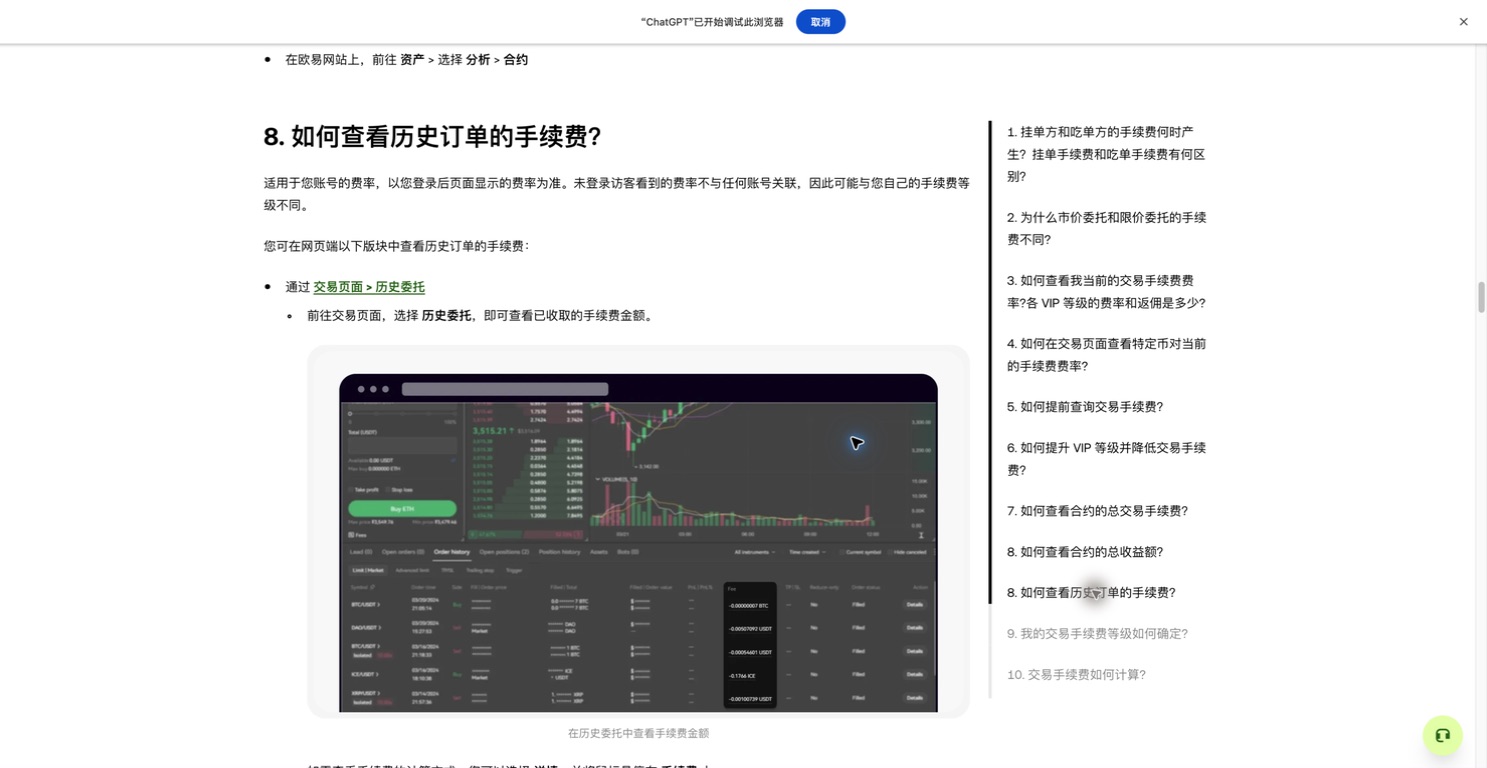
The official illustration shows the order-history area. Find the matching record before checking its status and fills. Captured on 2026-09-07 from OKX Europe’s Chinese help page. This is an official teaching illustration, not our account activity. Click to enlarge.
© 2026 OKX · View the official articleAn order or post-cancellation balance looks wrong: five checks
Check the records before deciding whether to change the order. This practical sequence helps avoid placing a duplicate.
- Match the record: check account, pair, side and date range. A current-pair filter can hide other orders. [5]
- Match status with quantity: read the final order status and cumulative fills. Cancelled does not mean nothing traded, and clicking Cancel does not prove cancellation succeeded. [3]
- If still open, check prices and instructions: a buy needs eligible asks; a sell needs eligible bids. The last trade is not a live offer. Check quantity too: IOC cancels the unfilled remainder, while FOK requires an immediate full fill or cancels. [7]
- If cancelled, compare the same asset’s available and reserved balances, rather than the portfolio’s converted total value. Check other open orders for reservations, and reconcile received crypto and fee assets for any fills. [5]
- If still unexplained, contact in-platform support with the order ID, pair, time, final status and fill records. Identify exactly which asset’s available balance disagrees with which record. Passwords and API secrets are not needed.
A few useful answers
If an order disappears from Open Orders, did it fill?
Not necessarily: it could be cancelled or expired. Inspect its final order status and check trade history for the quantity actually executed. [5]
Can a cancelled order still have a filled portion?
Yes. Cancellation applies to the remaining quantity. Trades executed before cancellation took effect remain valid; check the cumulative filled quantity. [3]
Should I switch to a market order to finish faster?
First confirm cancellation and any existing fills. A market order uses available prices and may execute across multiple levels; it does not retain your former limit. Decide whether you accept that change. [8]
The guides and exercises work independently of platform registration. Some platform links are referral links, and we may earn a commission if you register through them.
Check the original sources
Interfaces and rules can change. Check the current screen for your account and region before taking action. These examples explain how things work; they are not trading recommendations.
- OKX — What's a limit order?
- Binance — Why Wasn't My Limit Order Filled?
- Binance — Understanding Order Status
- Binance — What are Market Makers and Takers
- Binance — How to View My Spot Trading Activity
- OKX — How do I conduct spot trading?
- OKX — What are market and limit orders?
- Binance — What are Market Order and Limit Order, and How to Place Them?
- OKX — Trading Fee Rules FAQ
